WhatsApp AI Agents for Schools and Business Operations
How NovaFlow turns WhatsApp conversations into governed workflows for admissions, billing, service requests, customer support, and business operations.
The interface is simple. The execution layer is not.
Most organizations do not fail because they lack a dashboard. They fail because the work starts in one place, gets forwarded into another place, and dies somewhere between a spreadsheet, a WhatsApp group, and somebody’s memory.
A parent asks about student registration. A prospective customer asks for pricing. A tenant sends a complaint. A sales lead sends a product photo. The message arrives quickly, but the workflow behind it is slow: someone reads it, asks the same clarifying questions, checks a database manually, copies data into a system, and follows up when they remember.
That is the real reason WhatsApp AI agents matter. Not because chat is trendy. Not because every company needs a bot. WhatsApp is already where the intake happens. The engineering challenge is turning that messy intake channel into a reliable production workflow without losing context, security, or human control.
NovaFlow does not build FAQ bots
A FAQ bot answers “What are your opening hours?” and “Where is your office?” That is fine, but it is not where the operational value lives.
At NovaFlow Tech, we engineer workflow agents. A workflow agent does not stop at text generation. It identifies the user, validates intent, checks permissions, calls backend tools, writes structured records, updates CRM or ERP systems, handles state, escalates low-confidence cases, and produces a response that is both human-readable and auditable.
For schools, that can mean end-to-end student enrollment pipelines, tuition billing lookups, parent-teacher scheduling loops, attendance alerts, boarding updates, and report summaries. For businesses, it can mean lead qualification scoring, instant CRM syncing, real-time inventory querying, quotation drafting, customer support ticket routing, and operations reporting.
The promise is straightforward: if your business logic can be mapped, it can usually be automated. The hard part is not “adding AI.” The hard part is making the workflow explicit enough that software can execute it safely.
The production architecture is an execution stack
A serious WhatsApp agent has more moving parts than a chat demo. The first layer is the WhatsApp Business API or Meta Cloud API. It receives inbound messages and posts webhook events to a backend you control. That backend should not immediately dump everything into an LLM. It should authenticate the webhook, normalize the event, deduplicate repeated deliveries, rate-limit suspicious senders, attach user identity, and load the current conversation state.
From there, the message moves into an orchestration layer. This can be built with LangChain, a custom OpenAI Assistants API implementation, or a lean internal router. The router decides whether the message is a simple retrieval request, a workflow command, an ambiguous intent, or an escalation case. It then calls tools: database lookup, CRM write, ticket creation, invoice query, schedule availability, vector search, or human handoff.
The LLM is not the system. The LLM is one reasoning component inside the system. That distinction keeps the product maintainable.
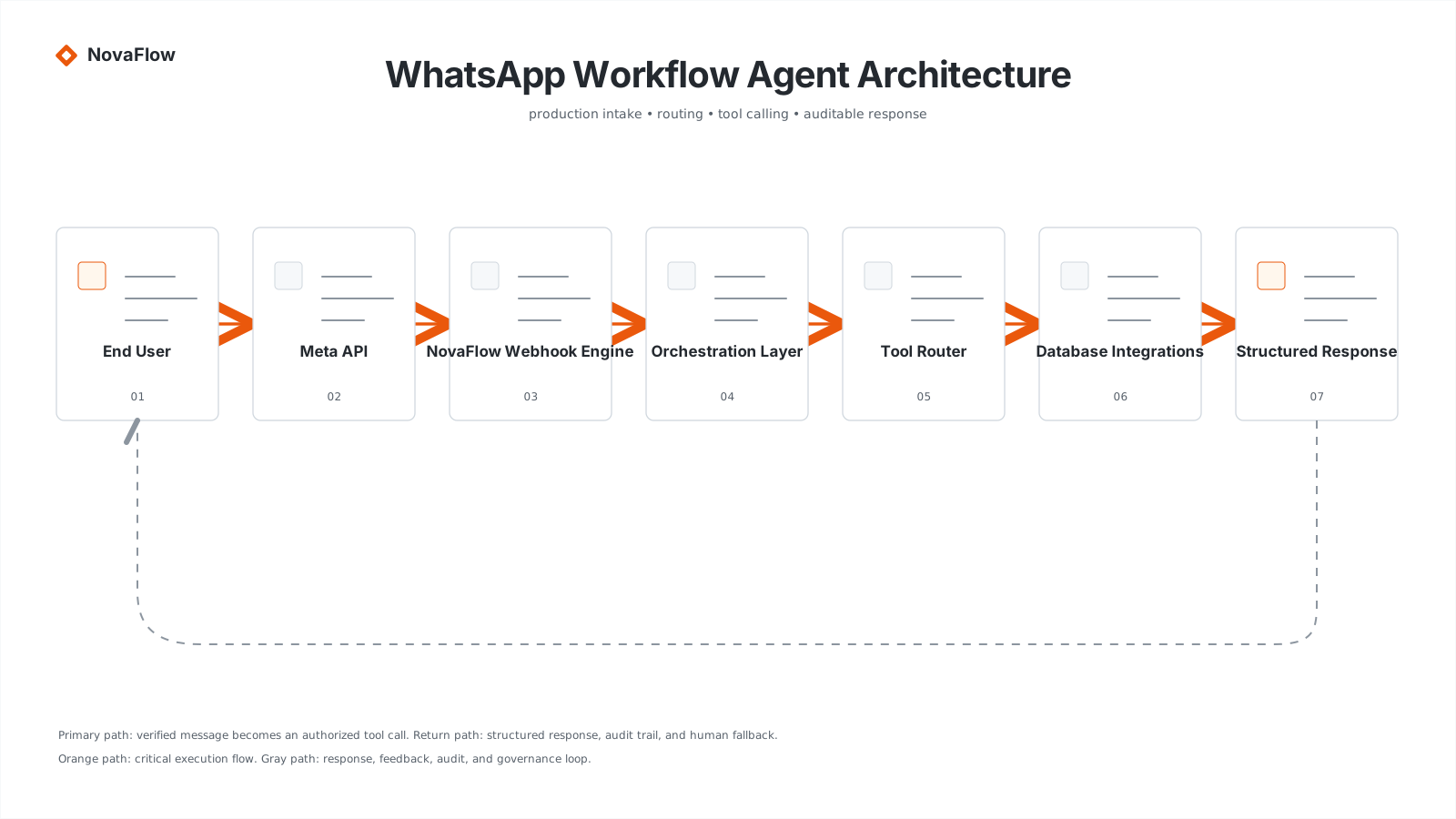
Webhook intake: treat every message like an event
The webhook is where discipline starts. Meta may retry events. Users may send five messages in ten seconds. Spam accounts may hit your number. A parent may send a voice note, then a photo, then “sorry wrong file.” If the webhook layer is weak, the entire AI layer inherits chaos.
A production webhook engine should perform signature verification, idempotency checks, sender normalization, channel metadata extraction, message type classification, and logging before the agent sees anything. For schools, it should map the phone number to a parent, student, class, or admission lead. For businesses, it may map the sender to a customer, account, sales pipeline, supplier, or open ticket.
The intake layer should also decide what not to process. Spam, unsupported files, repeated messages, and abusive traffic should be throttled before they consume AI tokens.
async function handleWhatsAppWebhook(event) {
  verifyMetaSignature(event.headers, event.rawBody)
  const message = normalizeWhatsAppEvent(event.body)
  const key = `wa:${message.id}`
  if (await redis.exists(key)) return { status: 'duplicate_ignored' }
  await redis.set(key, 'seen', { ex: 60 * 60 * 24 })
  await rateLimiter.consume(message.from)
  const session = await loadSession(message.from)
  return agentRouter.route({ message, session })
}
Session state: memory is not the same as context stuffing
A beginner implementation sends the last 30 messages to the model and hopes for the best. That fails quickly. Context windows degrade. Conversations drift. A school parent may ask about tuition, then registration, then attendance. A business lead may start with pricing, then send product requirements, then ask for a quotation. If every message is treated as raw chat history, the agent becomes expensive and inconsistent.
Use Redis or another session store for short-term state: current intent, last confirmed identity, pending form fields, active workflow step, and temporary tokens. Use a database for durable records: leads, tickets, invoices, student profiles, conversation logs, approvals, and audit trails. Use vector search for long-form knowledge: policies, FAQs, SOPs, product docs, school rules, pricing notes, and internal manuals.
Token limits are handled by summarizing the session, pinning critical state as structured data, and retrieving only the relevant knowledge snippets. The model should receive a compact working set, not the entire organizational memory.
{
  "sessionKey": "wa:+62812xxxx",
  "identity": { "type": "parent", "parentId": "par_9281", "linkedStudents": ["stu_1029"] },
  "activeWorkflow": { "name": "tuition_lookup", "step": "awaiting_month_selection", "missingFields": ["billingMonth"] },
  "contextBudget": { "maxMessages": 8, "maxVectorSnippets": 5, "summaryRequired": true }
}
Tool calling: the agent must earn every answer
A workflow agent should not invent billing status, enrollment stages, inventory counts, or ticket numbers. It should call tools. When a parent asks, “How much is my tuition bill this month?”, the agent should resolve the parent identity, verify the linked student, query the billing database, format the result, and log the interaction.
For an enterprise customer asking about inventory, the agent should check the SKU database or ERP, not guess from a product brochure. For a support complaint, it should create or update a ticket, not merely apologize in polished English.
Tool calling is where the system stops being a chatbot and starts becoming an operational surface.
{
  "tools": [
    { "name": "get_tuition_invoice", "description": "Fetch the latest unpaid tuition invoice for a verified student.", "input_schema": { "type": "object", "required": ["studentId", "billingMonth"] } },
    { "name": "create_support_ticket", "description": "Create a routed support ticket from a WhatsApp conversation.", "input_schema": { "type": "object", "required": ["customerId", "category", "summary", "priority"] } }
  ]
}
Confidence thresholds and human fallback
The agent should know when it is not sure. A production routing layer should assign confidence scores to intent classification, identity match, entity extraction, and tool result interpretation. If confidence drops below 0.75, the system should stop pretending and escalate.
Low confidence does not mean failure. It means the system protects the user from a bad automated answer. For schools, this matters when a parent asks about sensitive academic data, billing disputes, disciplinary notes, or registration exceptions. For businesses, it matters when a lead requests custom pricing, a customer reports a legal issue, or inventory data conflicts with the ERP.
The fallback should not dump the whole conversation on a human. It should create a clean handoff summary: who the user is, what they asked, what the agent understood, what data was checked, why the confidence was low, and what response is recommended.
if (route.confidence < 0.75) {
  await createHumanHandoff({
    channel: 'whatsapp',
    user: senderProfile,
    reason: 'low_confidence_intent',
    confidence: route.confidence,
    transcriptSummary: await summarizeConversation(session),
    suggestedNextAction: 'Ask the parent to confirm the billing month and student name.'
  })
  return reply('I need to verify this with our team first. We will follow up shortly.')
}
Spam, rate limits, and abuse handling
WhatsApp is convenient because everyone uses it. That also means the system must defend itself. Spam messages, repeated greetings, accidental forwards, large media files, and malicious prompts will happen.
Rate limiting should happen per sender, per tenant, and per workflow. A school parent asking three follow-up questions should not be blocked. A number sending 200 messages in a minute should. The agent must also ignore instructions embedded inside user messages that attempt to override system behavior. A WhatsApp message is data, not authority.
Schools: from registration to parent communication
For schools, the highest-value workflows are rarely generic Q&A. They are structured loops: student enrollment, document collection, tuition billing, attendance alerts, parent-teacher scheduling, dormitory updates, and academic progress notifications.
An enrollment workflow can start with a parent asking about admission. The agent collects grade level, student age, previous school, preferred campus, and contact details. It checks seat availability, creates a lead record, sends the document checklist, schedules an interview slot, and notifies the admissions team.
Businesses: from message intake to governed execution
For businesses, WhatsApp often becomes the unofficial CRM. Sales leads arrive there. Complaints arrive there. Purchase requests arrive there. Photos of receipts, products, broken equipment, and delivery notes arrive there. The problem is that WhatsApp alone does not enforce process.
A workflow agent can score incoming leads, sync them to CRM, route enterprise inquiries to sales, create support tickets, query inventory, generate quotation drafts, update order status, and produce daily summaries for management.