Self-Hosted Face Comparison API for Attendance Systems
How companies can replace per-call face comparison services with a private self-hosted API that supports attendance verification, peak-hour traffic, monitoring, and better data control.
A smaller system can solve a very expensive problem
Many attendance platforms already work well. Employees check in, the system captures a face image, compares it with a reference image, and decides whether the attendance record should be accepted. The problem often appears later, when every comparison depends on a paid third-party API and request volume keeps growing.
A self-hosted face comparison API is a focused way to reduce that dependency. It does not need to replace the whole attendance platform. It can simply accept two images, compare whether they belong to the same person, return a confidence score, and let the existing attendance system continue handling employees, shifts, check-in records, approvals, and payroll logic.
NovaFlow can develop this kind of private comparison layer for companies that want lower per-call cost, more infrastructure control, and a clearer operating model for biometric processing.
The important boundary: comparison API, not a new HR system
This kind of service should be deliberately narrow. The API should not know employee names, employee IDs, schedules, branches, payroll rules, or attendance decisions. Those responsibilities stay inside the existing attendance system.
The comparison service only processes an image pair. It detects faces, creates embeddings, compares them, and returns a result. That separation makes migration easier because the existing attendance logic does not need to be rewritten. In many cases, the caller only needs a new endpoint URL and new credentials.
This boundary also makes the system easier to govern. The face comparison layer can be stateless, process images in memory, and avoid storing employee identity data.
How the request flow works
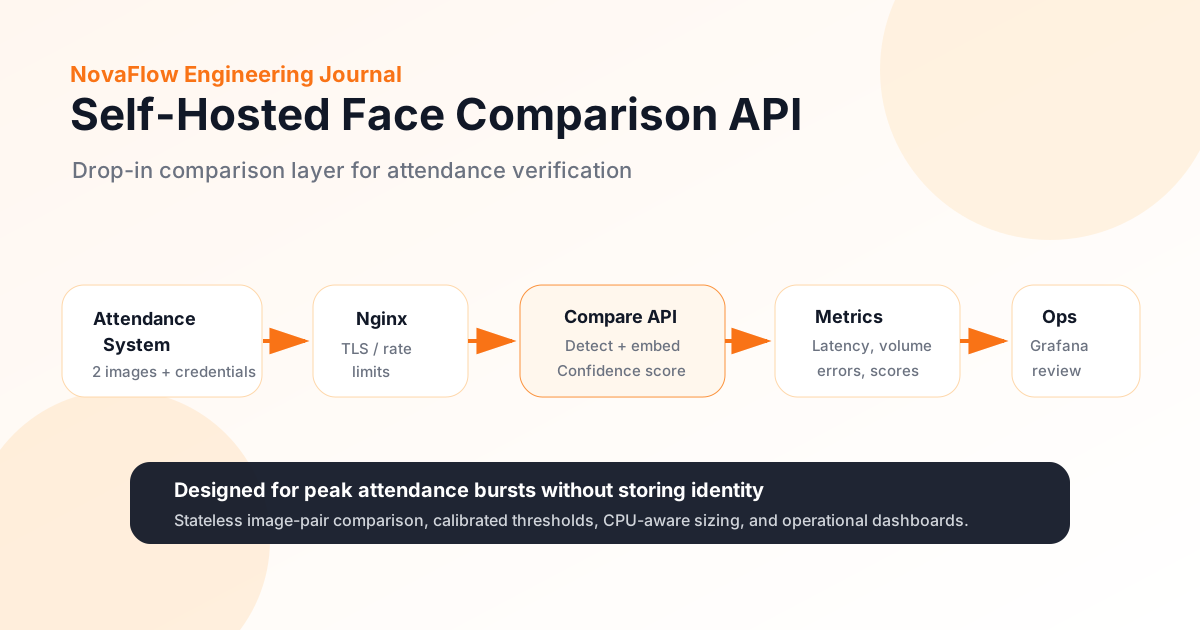
The existing attendance system prepares two images: usually a live check-in capture and a reference image. It sends both images to the private comparison API as a URL, file upload, or base64 payload.
The API validates credentials, loads the two images, detects and aligns the faces, generates face embeddings, calculates similarity, then returns a confidence score and calibrated threshold values. The attendance system decides whether that score is acceptable for check-in or check-out.
This is why compatibility matters. If the new endpoint follows the same request and response shape as the previous compare API, migration becomes much safer because business logic remains in the system that already owns it.
The attendance system stays in control.
It still handles employees, shifts, reference photos, clock-in records, approvals, and payroll-related decisions.
The new service compares two images only.
It detects faces, creates embeddings, computes similarity, and returns confidence without storing employee identity.
Operations can see volume, latency, and errors.
A dashboard replaces the black-box feeling of an external vendor console with internal visibility.
Peak hours are the real capacity test
Attendance traffic is bursty. The average daily number can look manageable, but most requests arrive around morning check-in and evening check-out. That is when slow responses become visible to employees standing at attendance points.
For example, a company may process around six thousand requests per day, with two large bursts around 9 AM and 6 PM. If each burst is compressed into a few minutes, the system must handle roughly ten requests per second while keeping response time stable.
This is why capacity planning should focus on peak windows, not only total daily usage. A practical target is to keep p95 response time low enough that queues do not build up at the physical or digital check-in point.
CPU-only deployment can work, but sizing must be honest
Not every company has a GPU server available. A CPU-only deployment can still be realistic if the model, worker count, and memory budget are chosen carefully.
For a self-hosted setup, the system may run as Docker Compose on a single machine with an API container, reverse proxy, monitoring, and dashboard. A multi-core CPU can run several workers in parallel, but each worker may load its own model into memory. That means RAM can become the real limit before CPU does.
A serious implementation should benchmark on the actual target hardware. The team should test model accuracy, p50 and p95 latency, memory usage, and burst behavior before declaring the server ready for production.
Monitoring is part of the product, not an extra
When a paid external API is replaced with an internal service, IT loses the vendor console unless monitoring is built from day one. That visibility should be recreated internally.
The dashboard should show request volume, latency percentiles, error rate, confidence score distribution, and per-client request volume. During peak hours, the team should be able to see whether the service is healthy or whether response time is starting to climb.
The important rule is to log operational metrics without storing submitted images or employee identity data. The goal is to understand system health, not to create a new biometric data warehouse.
Privacy and data handling need clear rules
Even if the comparison API does not store employee identity, it still processes face images. That makes privacy and data handling important from the beginning.
A good design processes submitted images in memory and discards them after comparison. It should avoid writing images to disk, avoid putting credentials in logs, and avoid using personal data as metric labels. Access to the API and dashboard should be controlled.
For Indonesian organizations, biometric processing should also be reviewed against applicable personal data protection obligations. The attendance system may own consent and retention, but the comparison service still needs disciplined processing boundaries.
Reliability depends on the host, not only the code
Self-hosted infrastructure gives control, but it also creates responsibility. If the service runs on one machine, that machine becomes operationally important during attendance bursts.
Teams should decide early whether the host should run a server-grade Linux environment or a Windows machine with Docker. Windows can work, but update and reboot behavior must be controlled carefully because a forced restart during check-in or check-out hours can interrupt attendance operations.
The deployment should also use pinned container versions, controlled memory limits, model cache volumes, health checks, restart policy, backup procedures, and a simple rollback plan.
What NovaFlow would build first
NovaFlow would start with a focused pilot: a compatible compare endpoint, secure API credentials, image-pair processing, face detection, embedding comparison, calibrated confidence thresholds, Prometheus-style metrics, and a dashboard for IT/Ops.
The first milestone should validate three things: accuracy compared with the current baseline, latency during real burst conditions, and clean data handling where images are not retained by the comparison service.
After the comparison layer is trusted, the company can expand around it if needed: better attendance dashboards, shift analytics, branch-level reporting, exception workflows, payroll export, or integration with wider HR and ERP systems. But the first value is already clear: replacing an expensive per-call dependency with a private, observable, self-hosted API.
The business outcome is control
A self-hosted face comparison API is not about adding complexity. It is about taking a repeated operational cost and moving it into infrastructure the company can control.
The attendance system keeps its role. The private API handles comparison. IT gets monitoring. Management gets lower dependency on per-call pricing. The organization gets clearer boundaries around biometric processing.
That is the kind of practical AI infrastructure NovaFlow can build: narrow enough to integrate safely, strong enough to handle real usage, and transparent enough for IT teams to operate with confidence.