NDF Resto AI for Premium Restaurant Operations
How NovaFlow structures restaurant operations around QR table ordering, POS visibility, kitchen routing, audit-ready logs, and management reporting.
Restaurant software fails in the handoff layer
Most restaurant software demos start with the same surface: a menu, a few order cards, and a dashboard that looks busy. That is not enough. A restaurant does not fail because the menu page is ugly. It fails because order intake, table context, kitchen routing, payment status, menu availability, and staff handoff are not connected.
NDF Resto was built as a compact operations demo for exactly that problem. It shows how a restaurant can combine POS-style screens, QR table ordering, menu control, order logs, and chat-based coordination into one lightweight system.
What resto.novaflowtech.id is actually proving
The demo at resto.novaflowtech.id is structured as a restaurant management surface with routes for dashboard, orders, menu, settings, QR, and logs. It is not positioned as a finished enterprise POS. It is a workflow prototype that demonstrates how restaurant operations can be mapped into software quickly without losing the realities of the floor.
The core idea is simple: customers order from a table-aware QR flow, staff sees operational order data, management can adjust menu and settings, and the system keeps logs that make the workflow auditable.
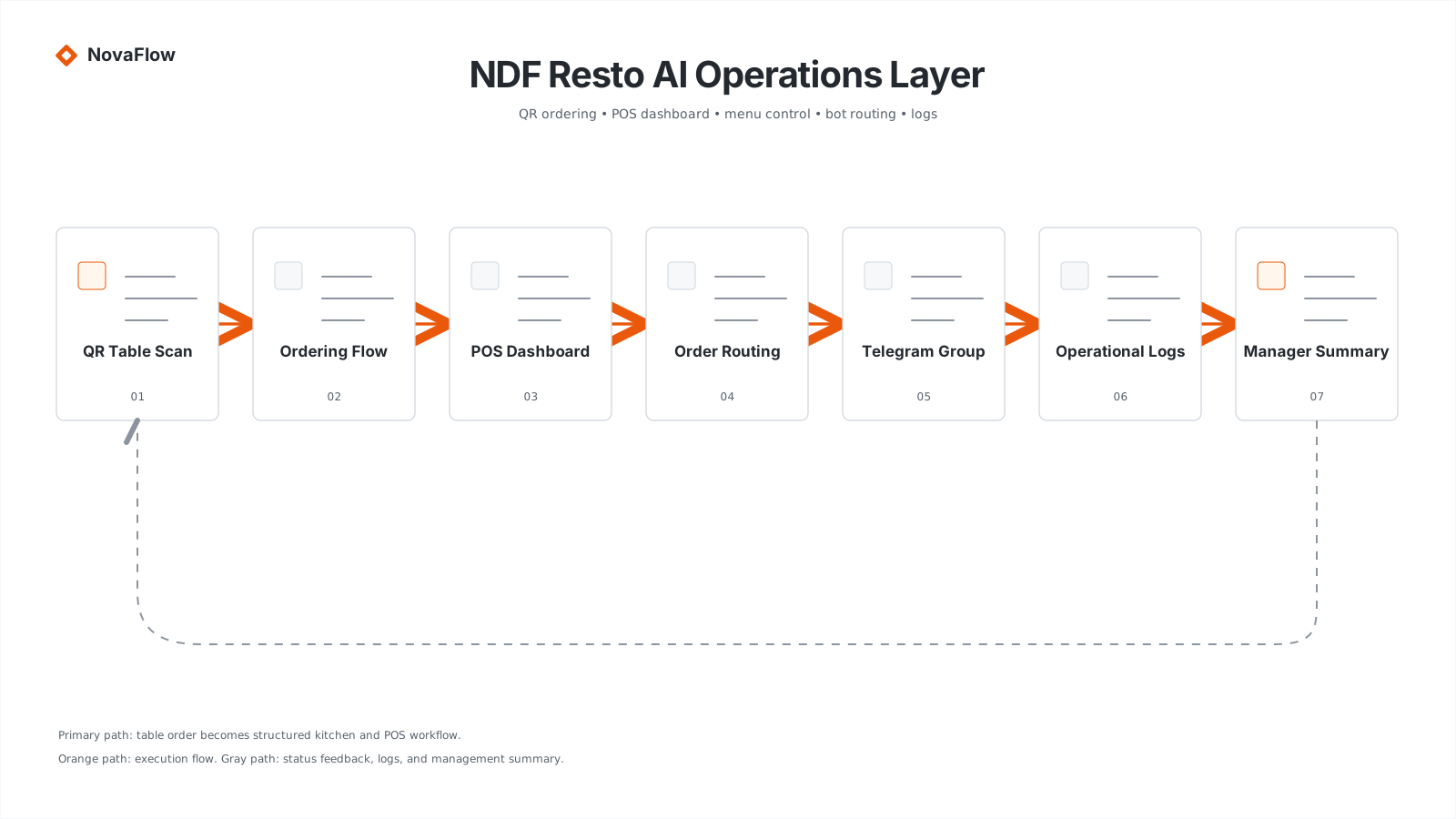
QR ordering is not just a link to a menu
A serious QR table ordering flow needs table identity, menu availability, item options, cart state, order confirmation, kitchen routing, status updates, and audit logs. If the QR only opens a static menu, the restaurant still needs staff to manually interpret and relay the order.
The value appears when a table scan becomes a structured order. Table number, item IDs, modifiers, notes, quantity, timestamp, and customer context should become a record that staff can act on.
type TableOrder = {
  tableId: string
  items: Array<{ menuItemId: string; qty: number; notes?: string }>
  source: 'qr' | 'staff' | 'bot'
  status: 'draft' | 'submitted' | 'preparing' | 'served' | 'paid' | 'cancelled'
  createdAt: string
}
The POS surface should be operationally boring
A good POS dashboard does not need to be visually loud. It needs to answer the questions staff actually ask: what orders are open, which table is waiting, which items are unavailable, what needs kitchen action, what has been served, and what still needs payment reconciliation.
For an MVP, the useful routes are dashboard, orders, menu, settings, QR, and logs. That is enough to demonstrate the operating loop without pretending to replace every restaurant system on day one.
Why bot and group routing matter
Restaurants already coordinate inside chat groups. Staff posts updates, owners ask for summaries, kitchen teams confirm changes, and managers check whether something is handled. NDF Resto includes the concept of a Telegram bot and internal group routing so the system can push operational context into the place where teams already respond.
This is not about making the bot cute. It is about making order events and operational issues visible. A bot can notify the group when a QR order is submitted, when an item is marked unavailable, when a table waits too long, or when a manager asks for the current order summary.
async function routeOrderEvent(order) {
  await db.orderLogs.create({ orderId: order.id, event: 'submitted' })

  if (order.source === 'qr') {
    await telegram.sendToGroup({
      group: 'NDF Resto Demo Group',
      message: formatKitchenOrder(order)
    })
  }
}
Menu management is workflow control
Menu management is not just editing names and prices. It controls what customers can order, what the kitchen can fulfill, and what staff must explain. If an item is out of stock, the QR order flow should stop offering it. If the kitchen changes availability, that should reflect quickly on the ordering surface.
The system should treat menu availability as operational state. Otherwise QR ordering becomes a faster way to create disappointed customers.
Logs make the demo credible
Operational logs are usually ignored in early demos. That is a mistake. Logs are what make the system debuggable, auditable, and trustworthy. Every order submission, status change, menu update, QR generation, and bot notification should leave a trail.
When a restaurant asks why an order was missed, the answer should not be “maybe someone forgot.” The system should show the order record, event timestamps, notification delivery, status changes, and staff action history.
The NovaFlow pattern is workflow-first, not UI-first
NDF Resto demonstrates the NovaFlow pattern for small-business operations: keep the user interface familiar, structure the backend carefully, and add workflow agents only where they reduce operational drag.
For restaurants, that means QR ordering for customers, POS views for staff, menu controls for managers, group notifications for coordination, and logs for accountability. The system is small, but the workflow architecture is real.
What this can become
From this demo, the next layers are clear: WhatsApp customer ordering, reservation flow, kitchen display, payment gateway integration, inventory alerts, daily sales summary, multi-branch reporting, and AI-assisted owner briefing.
The point is not to build all of that at once. The point is to prove that restaurant operations can be mapped into a clean workflow foundation first. Once the foundation is right, new modules stop feeling like hacks and start feeling like extensions.